Self-Hosting Supabase in Production: The 2026 Guide
Running your own Supabase means your data lives on your servers, under your rules. It also means seven jobs quietly become yours. Here's what they are, in plain terms, and what it feels like when they're handled.
Self-hosting Supabase is having a moment, and for good reasons: your users' data lives
on servers you choose, in a country you choose, under rules you set. No usage meter
ticking, no platform deciding your app's fate. If you're building with AI assistance,
it's also the version of Supabase your agent can see all the way into: nothing hidden
behind someone else's dashboard.
Here's the part that's easy to miss: the official setup gets Supabase running in half
an hour. Running is not the same as production. In between sit seven jobs that used
to be Supabase-the-company's problem and quietly become yours. You don't need to be
able to do all seven by hand to make a good decision here. You need to know what they
are and what "handled" looks like.
Quick disclosure: this is the Vibecarbon blog, and automating these seven jobs is much
of what Vibecarbon does. The list is true regardless of whether you ever use it.




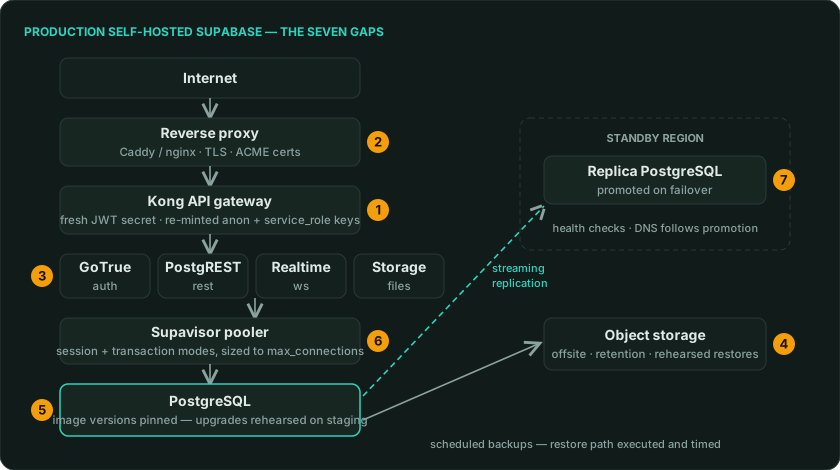
The anatomy of a production setup. The amber numbers are the seven jobs, in the order
they'll bite.
1. The demo keys everyone on the internet already has
By design, the starter setup ships with example passwords and keys (the same ones
printed in the public documentation) so it boots instantly for everyone. That's the
right call for a quickstart, and it comes with a production rule: until every one of
them is replaced, anyone who has read that documentation effectively holds keys to
your database, and there are automated scanners that do nothing all day but look for
exactly this. "Handled" means every secret is
freshly generated for your installation before any real data arrives, and the admin
dashboard isn't reachable from the open internet at all.
2. The padlock (and why login breaks without it)
Your site needs HTTPS (the padlock in the browser). It's not cosmetic: Google and
Apple sign-in flatly refuse to work without it, and browsers flag your app as
insecure. Getting it right means a piece of software sitting in front of everything,
fetching and renewing certificates automatically. Configured well, it's
set-and-forget. Configured badly, it's a recurring outage with your logo on it.
3. Sign-in is a hundred small settings, not code
Magic links that never arrive because no email service was connected. Google login
that works on your laptop and fails in production because two addresses don't match.
Two-factor authentication that exists but was never switched on. None of these are
bugs. They're configuration, spread across environments that each drift a little
differently. "Handled" feels like sign-in just working, everywhere, without you
thinking about it again.
4. A backup you've never restored is a wish
Most setups stop at "a copy gets made every night." But the copy lives on the same
machine that will eventually die, the copy-job breaks silently after some upgrade, and
nobody has ever actually tried turning a backup back into a working database. The real
standard is simple to say: copies go off the machine on a schedule, and the
restore has been done, timed, and written down, because the day you need it is the
worst possible day to learn it.
5. Upgrades are a project, not a button
Self-hosted Supabase is a dozen-plus cooperating services, each with its own versions.
Upgrading safely means knowing what changed, moving in the right order, and rehearsing
on a copy of your data first, which, conveniently, also proves your backups work.
Skipping this doesn't fail immediately. It fails months later, all at once.
6. The traffic spike that hits a wall
A database can only hold so many simultaneous conversations. The first time real
traffic arrives, unprepared setups hit that ceiling and start turning users away with
errors, on what should have been your best day. Supabase ships the fix (a connection
pooler, which shares those conversations efficiently), but it has to be configured
deliberately, and almost nobody does until an outage teaches them.
7. Surviving a bad day for a whole region
Everything above keeps one server healthy. If your product needs to survive a server
(or an entire data-center region) going dark, you're into a second copy of your
database in another region, kept continuously in sync, with a rehearsed way to promote
it and point the world at it. This is the moment "self-hosting Supabase" becomes
"operating a distributed database," and it's worth being honest about whether that's a
job you want.
What "handled" feels like
Every job on this list is real, none of it is your product, and all of it is the same
for every project, which is exactly why it can be automated well.
Vibecarbon generates a complete app (sign-in, billing,
teams, email, docs) on self-hosted Supabase, then makes this list the default state of
the world: secrets minted fresh for every environment, HTTPS provisioned as part of
deploying, sign-in pre-wired, vibecarbon backup and vibecarbon restore as
first-class commands, the pooler configured, and, when you're ready, a second-region
standby with one-command failover, with our measured recovery times
published openly.
The feeling it's built for: you run one command, and the seven jobs are just done. Not
hidden: done, inspectably, on your own servers.
Plain licensing note: the Vibecarbon CLI is Fair Source (FSL-1.1-MIT), source you can
read, though not technically "open source", and every release becomes MIT two years
after it ships. The app it generates is MIT from day one: yours outright.
If you'd rather own all seven jobs yourself, this list is your syllabus, and you'll
genuinely learn a lot. Either way: replace those demo keys first.