Coolify vs Dokploy vs Vibecarbon: Which Layer Do You Need?
Coolify and Dokploy give apps you've already built a home on your own server. Vibecarbon starts a step earlier: it builds the app too. A plain-language guide to picking the right layer.
Search for a "self-hosted Heroku alternative" and you'll meet Coolify and Dokploy,
usually compared head-to-head. Both are good at what they do, and this isn't a post
about which of them is better. It's about a question that matters more and gets asked
less: which layer of the problem do you actually need solved?
Disclosure: this is the Vibecarbon blog. We'll be straight about what Coolify and
Dokploy do well. For plenty of readers, one of them is the right answer.



What Coolify and Dokploy solve
Both are deploy platforms: you rent a server, install one of them on it, point it at
your app's code, and it takes care of turning that code into a running, reachable
website, with the secure padlock, a dashboard to watch it all, and databases managed
alongside. That used to require a platform like Heroku and a monthly bill that grew
with you; these tools give you the same push-to-deploy feeling on hardware you
control. Both are genuinely open source and well-loved for it.
They differ in texture: Coolify has the bigger ecosystem and a huge catalog of
one-click extras; Dokploy is newer, with a polished interface and built-in support for
spreading across several servers. If you have apps ready to deploy and want a
dashboard for them, pick whichever suits your taste. You don't need us for that
decision, and there's no catch we're pretending not to see.
The layer they don't solve
Every deploy platform shares one quiet assumption: you already have the app.
If what you're building is a real product, "the app" is where most of the work lives.
And it's strangely identical from product to product. Sign-in (with Google login,
email links, two-factor). Payments and subscriptions. Teams and invitations. An admin
area. The emails your app sends. A site with a blog and docs. Translations. And
underneath all of it, the security plumbing that keeps one customer from ever seeing
another customer's data. None of that is your idea. All of it stands between you and
shipping your idea. And if you're building with AI, it's precisely the part where
agents make the expensive mistakes.
A deploy platform meets you after all that work is done. That's the layer
difference.
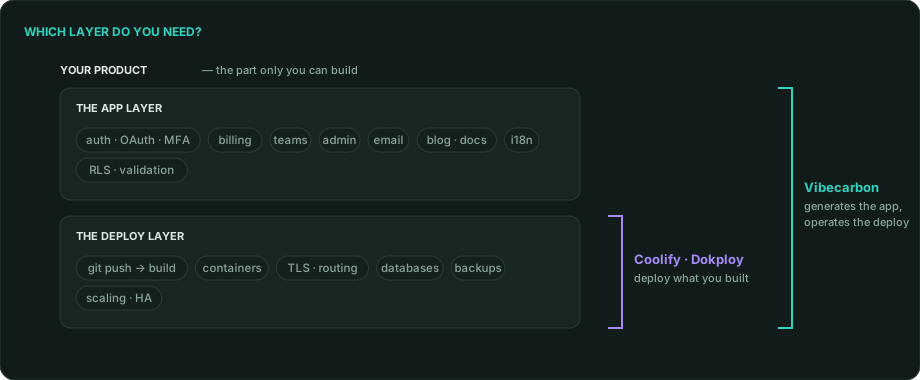
The two layers. Coolify and Dokploy meet you at the deploy layer; Vibecarbon
generates the app layer and operates both.
What Vibecarbon solves
Vibecarbon starts one step earlier. One command generates the entire app: sign-in,
billing, teams, email, blog, docs, translations, and the security plumbing, all
already wired together by people who obsess over exactly this architecture. The same
tool then deploys and runs it: on a single rented server to start, growing to
multi-region setups that survive a data center going dark, with backups and scaling
handled. One tool, both layers, on whatever provider you choose.
The trade-offs, stated plainly:
- It's a command line, not a dashboard. You type
vibecarbon deploy; Coolify and
Dokploy give you buttons. (Your app does get its own built-in admin panel.)
- It runs what it generates. Coolify and Dokploy deploy anything; Vibecarbon is
not a general-purpose deploy tool. If you're bringing an existing codebase, they're
the right choice and we're not.
- Different license. Coolify and Dokploy are open source. The Vibecarbon CLI is
Fair Source (FSL-1.1-MIT). You can read every line, but it isn't technically
open source and we won't call it that. Every release becomes MIT two years after it
ships, and the app it generates is MIT from day one: yours outright.
The honest chooser
| Your situation |
Pick |
| Apps already built, want a self-hosted home with a dashboard |
Coolify or Dokploy |
| Lots of assorted services, one-click catalog matters |
Coolify or Dokploy |
| Starting a new product and the months of app-plumbing are the obstacle |
Vibecarbon |
| Want the app and its operations (backups, scaling, failover) from one tool |
Vibecarbon |
| Allergic to command lines |
Coolify or Dokploy |
| Want to read every line your stack runs on |
All three. That's the point of self-hosting |
Two closing honest notes. These layers aren't rivals forever: a Vibecarbon-generated
app is normal code you own, and nothing stops you running other projects on Coolify
beside it. And whichever you pick, you're taking on self-hosting: our
plain-language guide to what that means at the database layer
applies whether or not you ever touch our tool.
Ready to skip the plumbing? npm install -g vibecarbon, then vibecarbon create, and
start here.